Ives & Sebastian Press Audio Thesis Question ForeverUI Share tips & screenshots Dent Repair USA Support
ForeverUI
Clean UI. Total control.

A whole interface,
in one addon.

ForeverUI replaces the default interface of World of Warcraft: Forever — action bars, unit frames, cast bar, minimap, nameplates, chat, bags and the quest list — and adds click-cast grids built for healing, tanking and damage, your own aura icons, loot advice and a quest helper. Keyboard and mouse or a controller. One download, one settings window.

Free. No ads, no account, nothing to buy. Built for the Forever beta (client 1.60.1).

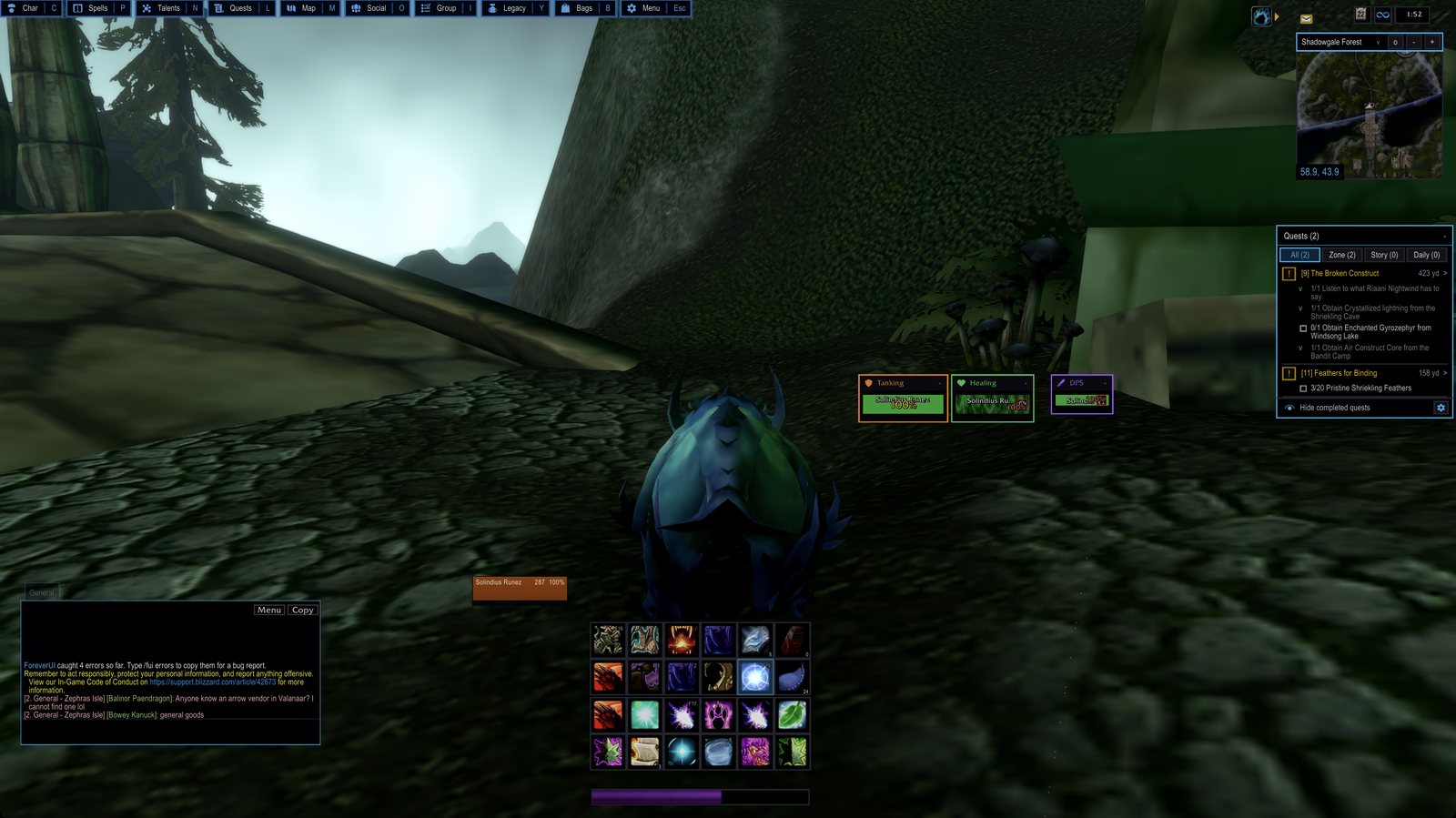
ForeverUI in the world: action bars, role grids, minimap and quest tracker
The whole interface, running. Nothing here is the default UI.

One addon instead of a dozen

Every part can be switched off if you already have a favourite. Turn a module off and the game's own version comes back.

Action bars

All eight bars, any size, spacing and shape. Cooldown numbers, red when out of range, icon zoom, rounded buttons if you like them. Locked in play — hold Shift to move a spell.

Keybinding that works

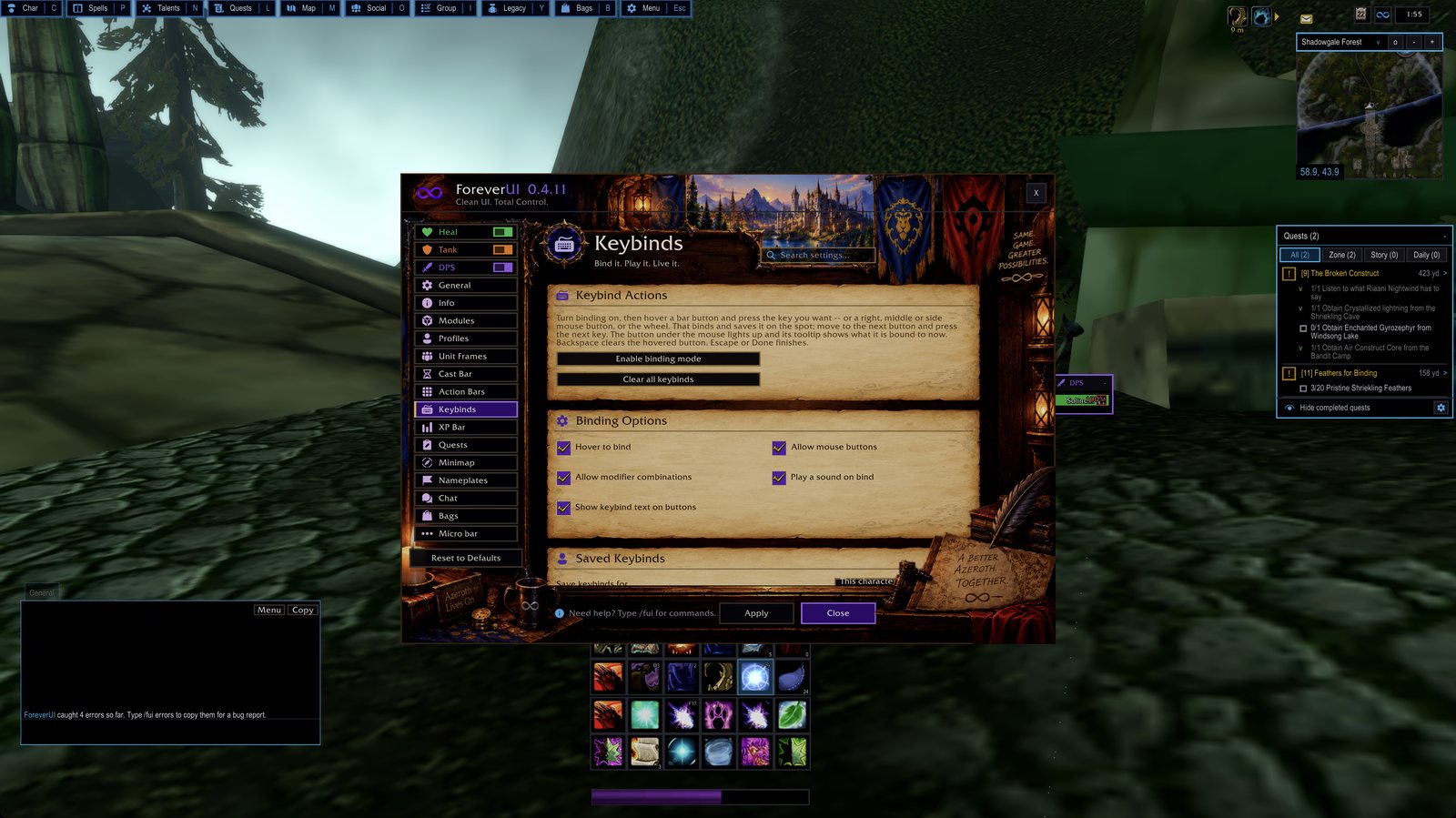
Hover a button and press a key. No dialogs, no picking from a list — and mouse buttons and the wheel bind the same way.

Healer, tank and DPS grids

Click-cast party and raid frames with a grid per role, each keeping its own size, colours and bindings — and each one always on, in groups only, or off.

Unit frames

Player, target, target-of-target, pet and focus, with health and power text, incoming heals and shields, buffs and debuffs, and a hunter’s pet happiness.

Cast bar

Your casts where you want them, not welded to the bottom of the screen.

Minimap & micro bar

A square minimap that stays out of the way, and the micro menu rebuilt as tiles that can fade away until you point at them.

Nameplates

Cleaner plates with the health and names you actually need in a pull.

Chat, bags, quests

Chat in your own colours with tabs that can fade away, one-window bags with your bag slots on a strip above, and a quest list that puts the nearest quests first.

Set-up in one page

A short installer on first login picks a layout and a role. After that, everything lives in one window.

Plays with a controller

Forever ships Blizzard’s full controller interface. ForeverUI’s own bars, bags and micro bar step aside for it; your frames, auras, quests and the look stay.

ForeverAuras

Your own cooldown, buff and debuff icons — a countdown, a glow and a sound when ready — placed anywhere. No WeakAuras needed.

Loot advice & QuestForever

What each new item is good for (junk, not for you, an upgrade), and a quest helper that puts every pick-up, hand-in and objective on your map.

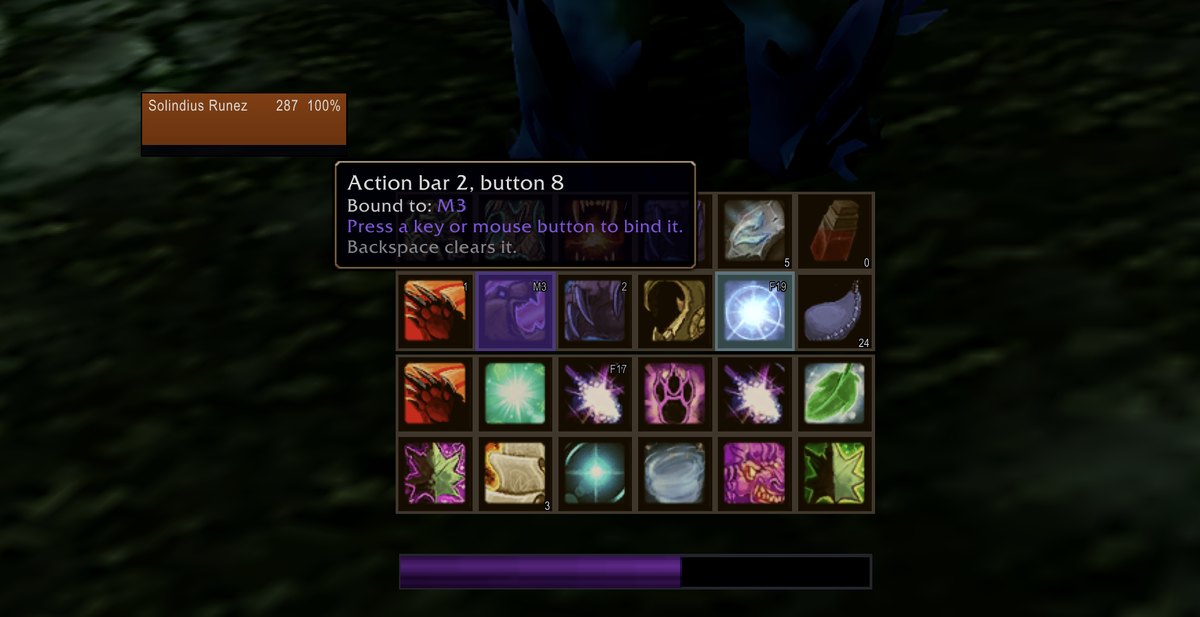
Hover a button.
Press a key. Done.

Binding mode puts a panel on screen and tints every bindable button. Point at one: it lights up and its tooltip tells you what it is bound to right now. Press a key, a mouse button or the wheel and it is bound and saved on the spot. Backspace clears it. Typing in chat still types, even with the cursor resting on a bar.

Binds are kept per character or shared across all of them, and ForeverUI puts them back every login — which matters on the beta, where the game forgets its own.

Keybind mode: the tooltip over a button shows what it is bound to
The button under the cursor, and what it is bound to.
The keybind mode panel
The mode tells you what it is doing, and where the binds are being saved.

A window for how you play

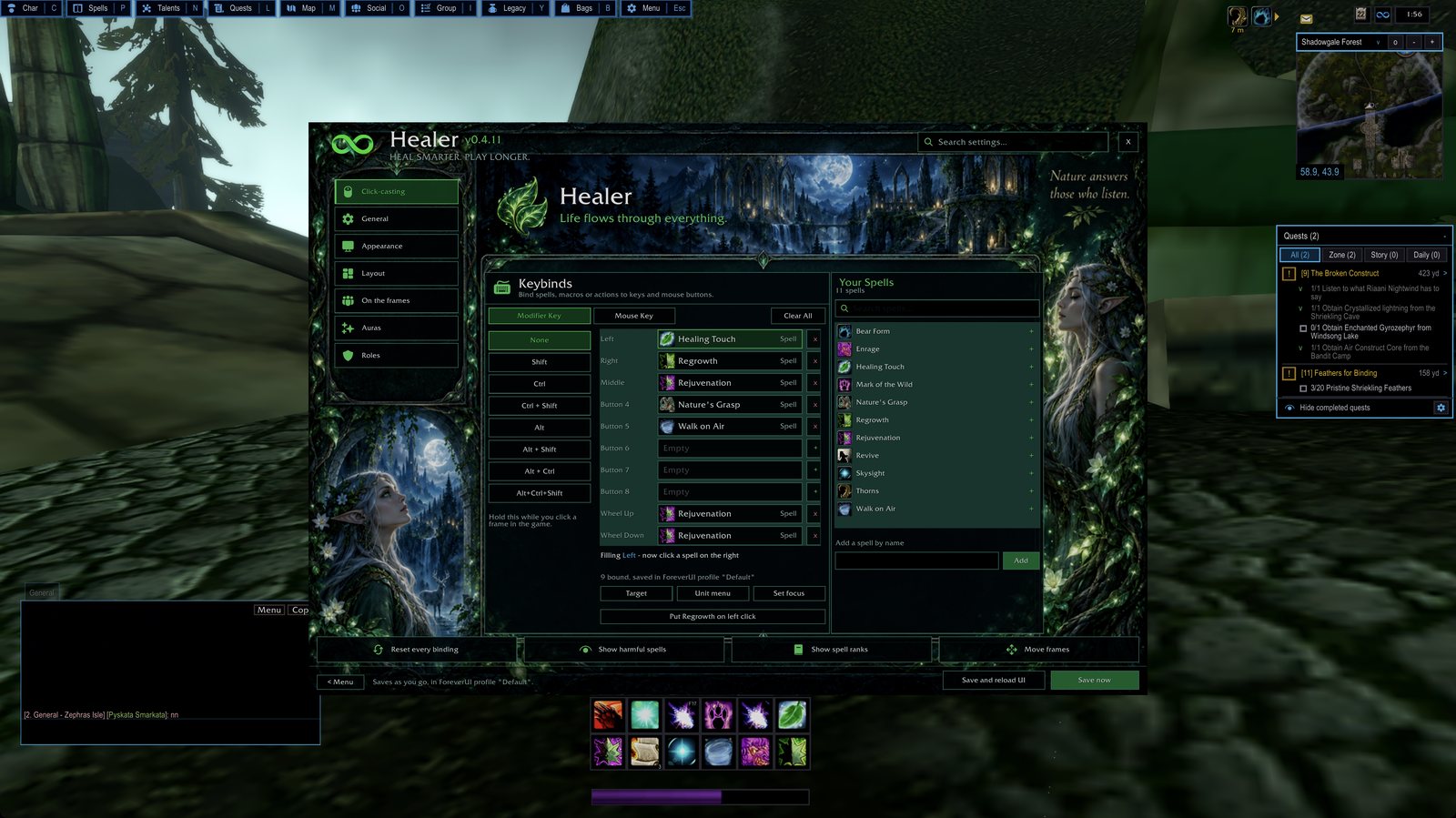
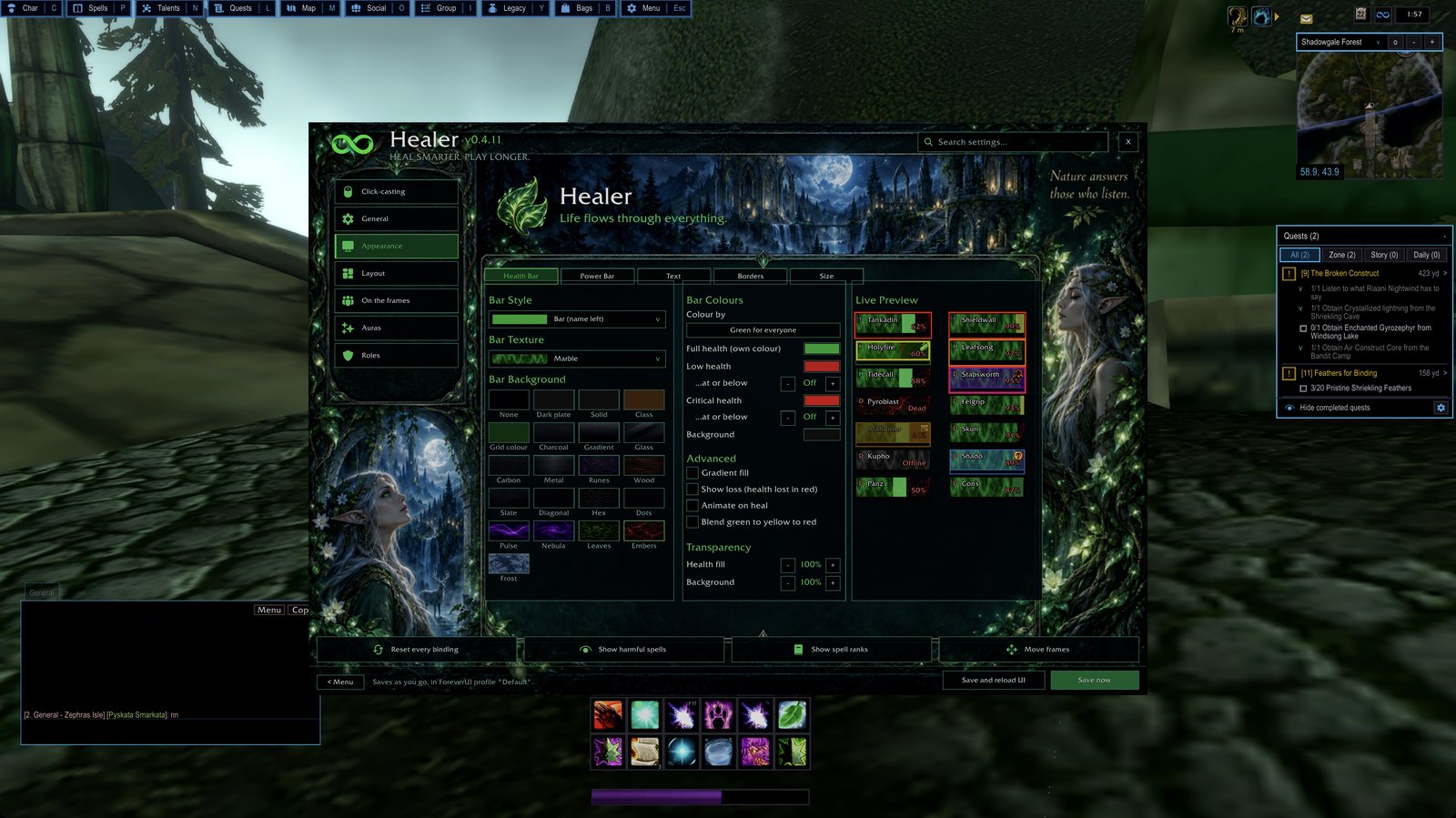
Healing, tanking and damage each get their own window, their own click-casts and their own look. Change the tank's bars and the healer's stay exactly as they were.

The Healer window: click-cast bindings and spell list
Healer: every key and mouse button, with the spell it casts.
Health bar appearance settings with a live preview
Bar style, textures, colours and thresholds — with a live preview.

Everything in one place

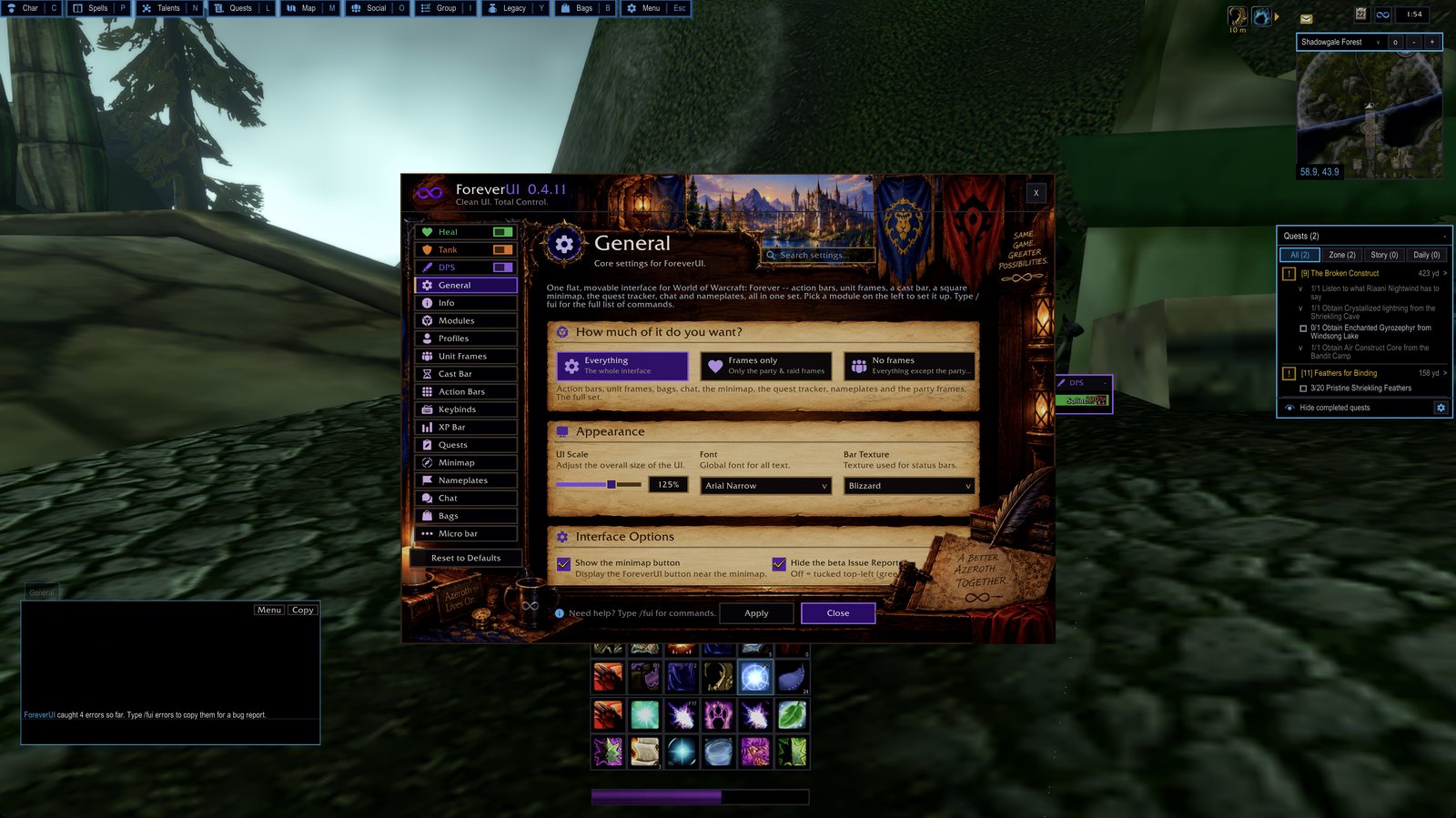
No scattered slash commands to memorise. /fui opens the lot; the search box at the top finds any setting by name.

The ForeverUI settings window
One window, a module list down the side.
The Keybinds page
Keybinds: binding mode, what may be bound, and where binds are saved.

Installing

Either way works. The CurseForge app keeps it updated for you; the zip is the same files by hand.

  1. Download ForeverUI-0.4.100.zip and unzip it.
  2. Drop the ForeverUI folder into your game's AddOns folder:
    World of Warcraft/_classic_beta_/Interface/AddOns/
  3. Restart the game (or type /reload) and answer the short set-up questions.

The folder inside the zip must be named ForeverUI — if your unzipper makes a ForeverUI-0.4.11 folder with another folder inside it, move the inner one.

About saving on the Forever beta

The beta client has a bug of its own: it writes every addon's settings to disk and never reads them back after a reload or a restart. It affects every addon, not just this one, and only Blizzard can fix it.

ForeverUI works around it by keeping your essentials — your set-up answers, which modules run, your role grids and their click-casts — in two character macros named FUI Save 1 and FUI Save 2. They come back automatically when you log in, so don't delete them, and keep two macro slots free.

To keep a change: make it, wait a few seconds, then reload. The addon explains this in game the first time it happens, and /fui saving brings it back with a ready-made bug report you can paste to Blizzard. Please do report it — the more reports, the sooner it is fixed.


What's new

0.4.100

0.4.99

0.4.98

0.4.97

0.4.96

0.4.95

0.4.94

0.4.93

0.4.92

0.4.91

0.4.90

0.4.89

0.4.88

0.4.87

0.4.86

0.4.85

0.4.84 — the damage meter

0.4.83 — the big one

0.4.82

0.4.81

0.4.80

0.4.79

0.4.78

0.4.77

0.4.76

0.4.75

0.4.74

0.4.73

0.4.72

0.4.71

0.4.70

0.4.69

0.4.68

0.4.67

0.4.66

0.4.65

0.4.64

0.4.63

0.4.62

0.4.61

0.4.60

0.4.20 – 0.4.59: the highlights

0.4.19

0.4.18

0.4.17

0.4.16

0.4.15

0.4.14

0.4.12

0.4.11

0.4.10

0.4.9

Older entries live on the CurseForge files page.


Questions

Does it work on retail or on Classic Era?

It is built and tested for WoW: Forever (client 1.60.1). It is not tested anywhere else.

Can I keep my own action bar addon?

Yes. Switch the Action Bars module off in the settings and the rest carries on without it. Every module works that way.

I heal on one character and tank on another.

Each character picks a role, and each role keeps its own grid, bindings and appearance. Changing one never touches the other.

Something went wrong.

Type /fui errors — it collects what the addon caught, ready to paste into a comment on CurseForge.

Try it

Made in Grevesmühlen. Bug reports and ideas are welcome on the CurseForge comments.